
If you’re unable to open/view roles in Server Manager (Windows Server 2008) , the problem might be with a patch which was not installed properly Or the server is not rebooted for long time after patches installation. Here are the steps to be followed to resolve the error.
Problem Description
a. In server manager you can not see any roles or features that are installed and in the bottom of the screen there is an error that says:
 Last refresh: Failed Enable Error Details
b. When you click on Error Details you’ll see the following error :
 Unexpected error refreshing Server Manager: No signature was present in the subject. (Exception from HRESULT: 0x800B0100)
 Problem Resolution
Step 1. Determine Update state of system
a. This step can be done by using a new tool developed by Microsoft to resolve these kind of issues :
WS08 ·
b. When you install this “Update” a logfile will be generated at c:\windows\logs\CBS with the name CheckSUR.log
The content of this log :
=================================
The content of this log :
=================================
Checking System Update Readiness.Version 6.0.6001.222752008-10-18 09:38
Checking Deployment Packages
Checking Package Manifests and catalogs.
Checking package watchlist.
Checking component watchlist.
Checking packages.(f) CBS MUM Missing 0x00000002 servicing\packages\Package_for_KB951978_server_0~31bf3856ad364e35~amd64~~6.0.1.0.mum (f) CBS MUM Missing 0x00000002 servicing\packages\Package_for_KB951978_server~31bf3856ad364e35~amd64~~6.0.1.0.mum (f) CBS MUM Missing 0x00000002 servicing\packages\Package_for_KB951978~31bf3856ad364e35~amd64~~6.0.1.0.mum
Checking component store Checking SMI StoreSummary:Milliseconds: 197278Found 3 errors CBS MUM Missing Total Count: 3
Checking component store
Checking Deployment Packages
Checking Package Manifests and catalogs.
Checking package watchlist.
Checking component watchlist.
Checking packages.(f) CBS MUM Missing 0x00000002 servicing\packages\Package_for_KB951978_server_0~31bf3856ad364e35~amd64~~6.0.1.0.mum (f) CBS MUM Missing 0x00000002 servicing\packages\Package_for_KB951978_server~31bf3856ad364e35~amd64~~6.0.1.0.mum (f) CBS MUM Missing 0x00000002 servicing\packages\Package_for_KB951978~31bf3856ad364e35~amd64~~6.0.1.0.mum
Checking component store Checking SMI StoreSummary:Milliseconds: 197278Found 3 errors CBS MUM Missing Total Count: 3
Checking component store
c. This means that from the KB951978 *.MUM files are missing in the packages store (located at c:\windows\servicing\packages)
Step 2. Retrieve the missing files
a. Download the KB Update as we need to extract files from it. In your Update History you can find this update fast as it is listed as the first failed update that happened :
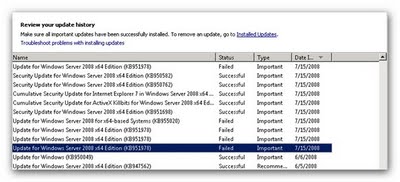 b. Now double click this update.

c. Click on the link to the KB Article, this link will open internet explorer and just scroll down to the download links on the page :
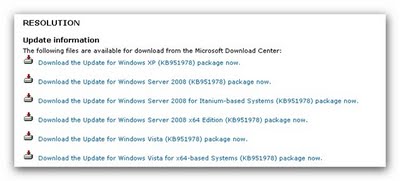 d. Download the related package, rename the extension of the file from MSU to CAB
e. Open the file

f. Extract the CAB file to another location for example c:\temp
g. Open the cab file and search for the files that are listed in the checksur.log, extract those files to another lcoation (C:\temp)
h. Most of the time 1 of the files can not be found : Here it is
Package_for_KB951978~31bf3856ad364e35~amd64~~6.0.1.0.mum
Package_for_KB951978~31bf3856ad364e35~amd64~~6.0.1.0.mum
i. Extract the update.mum instead and rename it to the missing name.
j.Now we have a collection of files that need to be copied to a protected location (C:\Windows\servicing\packages)
Step 3. Install the missing files
a. First we need to unprotect the packages directory so we can copy files to it
right click “Packages” Folder and choose properties, select tab security, click advanced and click on the tab “Owner”
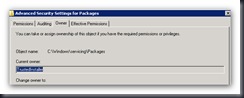
b. As you can see the correct owner (trusted installer) is listed, for now you need to change the ownership to your own account. When done, you will be returned to the security overview, add yourself with full control permission to the folder
c. Now we can copy the missing files to the packages directory.
d. Most of the times you need to rerun the update to determine which files are missing and it will list *.CAT files as missing so you need to repeat the steps for extracting and copying the missing files.
e. If Still the check says that one package is missing, rename update.cat & update.mum to that missing package name and copy those files to c:\windows\servicing\packages.
f.Rerun the update detection until the log file does not report any missing files.
g.When all is well, the error’s in server manager are gone :

And the Roles can be viewed again :

Don’t forget to set the rights of the Packages folder back to how they were.
 Technical Blog